iPhone 5 external battery experiment: Day 1

So, I got my external battery and decided that I would try it out each day by only using the external battery to recharge my iPhone 5 whilst out and about rather than using a mains power source or a PC or something similar.

I started the day fine. My battery was at 100% at 7am and I used the device normally. About 2:30 or 3pm it had dropped to 20% so I connected the external battery. I switched it on and all was good. I kept a close eye on both the iPhone and the battery as I’d heard about issues with overheating, but I had no such problems at all. In fact, the entire process was completely smooth and incident free.

Once the time the iPhone 5 had gone back up to 100% I disconnected the battery, which was still showing 4 bars (actually circles, but it means the same thing).

We’ll see how the process develops tomorrow.

The problem with power

For a while now I’ve been having issues with my iPhone 5’s. Basically the battery life has been getting progressively worse over the last few months until now it will barely last a whole day with minimal use. This is not good. I know that battery life on these devices is never ‘good’, but this is moving along a path to unusable. The device is over a year old, and I suppose you could say that I’ve used it pretty heavily over that year. So maybe it’s just to be expected. I don’t know.

What I can tell you is that my current solution is to use a portable battery for my iPhone. Apparently this battery should last me for about 4 or even 5 charges. That’s what it says it’ll do anyway. My plan is to test it tomorrow and see how both devices get on with each other.

A big bunch of Launch Center Pro sample actions

I found these the other day when I was checking LCP’s twitter feed for useful things, and it is very handy indeed. Not just for the actual actions themselves, but for use as a starter to understand how to create your own from them. It’s always easier to do that with something to work from.

So if you want to use these you’ll need to from within mobile safari on your iOS device.

And another app offers further automation possibilities … Phraseology

And now another app promises integration and connectivity with the growing array of URL scheme enabled apps that I own but as yet can’t work out what to do with. This one, Phraseology is a writing app for the iPad. It looks very useful, and is from the same developer who makes Drafts, Drafts for iPad and Terminology. So in theory it should tick all the boxes, and as such I’ll probably give it a try.

But it does make me wonder where all this automation capacity is going to take me, and when? So far I’ve managed to get a few things working, but nothing ground breaking, nothing that really changes my workflow and delivers enough automation against what I’m looking for. Of course, I could just be being over ambitious, that’s a distinct possibility. So for now I’ll keep at it, and perhaps try some simpler things to start off with.

A new app in the automation collection … Unread

I found a new app that I’m hoping will really help with some of my aspirations for automating things in iOS. It’s called Unread.

Here’s the app’s description (which I’ve edited down a bit):

Rediscover the joy of reading your favorite writers with Unread, an RSS reader for iPhone.

Unread will surprise and delight you in many ways, but that’s not important. What is important is that Unread will help you find a little peace each day through quiet, careful reading.

FULL-SCREEN READING

Focus on the act of reading with Unread’s full-screen article view. Articles are typeset in beautiful fonts from Hoefler & Co. Let nothing stand between you and the words of your favorite writers except a thin sheet of glass.

DESIGNED FOR COMFORT
Move anywhere in the app with a sweep of your thumb, all without having to reposition your hand. Unread’s stacked navigation was built from scratch to be the most comfortable interface you’ve ever used. Flick left-to-right to go back from anywhere on the screen, just like dealing a deck of cards. Tug any screen right-to-left to show options for that screen — just like pull-to-refresh, but sideways.

MULTIPLE THEMES
Like to read in bed? Don’t wake up your partner with glaring white light. Unread has multiple themes designed to make it easy to read under daytime or nightime lighting conditions. There are several fun hidden themes, too.

SHARE THE GOOD STUFF
You shouldn’t have to struggle to send articles to the places you like best. Apps should do that hard work for you. Share your favorite articles via the rich options built with OvershareKit, an open-source sharing library for iOS. OvershareKit was born inside of Unread, and is being discovered by more apps all the time.

SO MUCH TO LOVE ABOUT UNREAD

  • BACKGROUND REFRESH • Unread keeps your subscriptions up to date with power-efficient background updating. Articles and images are saved to your device for convenient offline reading.
  • SHARING • Send articles to Instapaper, Pocket, Readability, Pinboard, or your Reading List. Share articles and images via App.net or Twitter with as-you-type syntax highlighting, swipe gesture shortcuts for the cursor, and automatic smart quotes. Send a snippet of highlighted text to Omnifocus or Things for a quick reminder. Even more options are on the way.
  • QUICK ACCESS • Double tap an article summary to instantly toggle read/unread status. Press and hold to show a menu of options. This is great for quick sharing or for jumping straight to the web to view the original article.
  • LINKED-LISTS • If an article is a linked-list article, like those written by John Gruber at Daring Fireball, the article summary shows the domain name of the linked item’s site. Many times the domain is a punchline all by itself.
  • BIG THUMBNAILS • Turn on the optional inline thumbnails to see big previews of article images while you scroll.
  • FOOTNOTE POPOVERS • Articles with properly-formatted footnotes will show convenient popovers when you need to read a footnote.
  • PERSISTENT WEB BROWSER • Instead of a transient browser that disappears as soon as it goes offscreen, Unread’s web browser stays around. It remembers your back/forward history and retains the current page. Now you can finally switch back to finish an article without losing your place on an interesting site. You will wonder why every app doesn’t work this way.
  • VOICE OVER & ACCESSIBILITY • Unread has 100-percent VoiceOver coverage. Every screen and every feature is available to users with vision impairments. Font sizes are adjustable, too, from Tiny to EPIC and many points between.

What the description doesn’t really go into enough is that it is integrated with Drafts and is, as far as I can see, a reasonable step in the right direction in automation terms. So I’m going to try this out and see if it takes me in the right direction. We’ll see.
And then Launch Center Pro for iPad arrived

This has been a long time coming in my view. Launch Center Pro as a very handy app and well worth having if you’re trying to automate things on your iOS device. Now that it’s available for the iPad that represents a big step forward for automation and workflow.

Also it’s 40% off for launch (no pun intended), so it’s £2.99 right now.

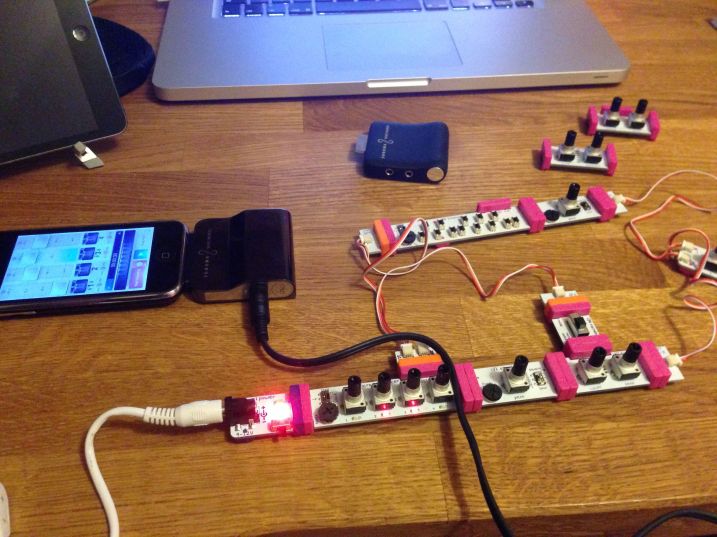
Loving messing about with littleBits Korg Synth kit

littleBits Synth with iPhone 3G and GuitarJack

To the extent that I’ve been wondering about getting some of the other components to do even more interesting things with it. I’ve also been thinking about how to combine it with some of my other gear to see how it can work together. It really is awesome stuff!

I recorded some sounds from the littleBits kit using my GuitarJack line in and my iPhone 3G running FourTrack, which still works like a dream!

iOS Automation apps page is live

If you’re interested in automating stuff on your iOS device then I’ve just published a little list of the main apps I use for this. I hope to publish some more on the subject too, but for now, the list is available here.