The iOS7 dilema

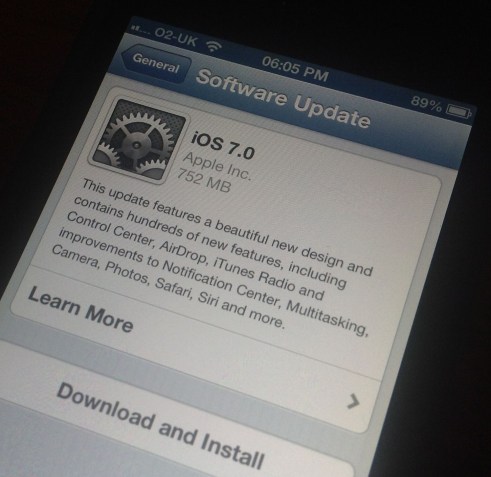
 IMG_0327

So, iOS7 is upon us. On the one hand all the music app developers are saying don’t update. On the other hand there are loads of really amazing non-music updates already in, and at least one app that has become iOS7 only.

So I want to move, but I don’t want to break everything, and I certainly don’t want to end up with glitchy audio issues.

So the only thing I can do is to wait.

IFTTT and connecting things to other things

I haven’t written about IFTTT for a while now although I’m still a big fan. Of course, of late, their big news is their iOS app. It was a very clever way to bring the service to iOS. They didn’t just bring the web version of the service to the app store. Instead they made it work beautifully, but over and above that gave the app specific iOS only channels. Now that’s clever.

Of course one of the big problems with IFTTT is that it works so well. Which means that actually you can for the most part just forget about it and leave it to get on with what you wanted it to do in the first place. However, I guess that is almost a problem for IFTTT as they probably want you to do more than set up a bunch of recipes and then never return, or rarely return.

So the app addresses that to a degree. I found myself using it for a while and then recently a lot less. Again, the reason is that IFTTT works so well that I don’t need to do anything more.

There are still lots of things I think that IFTTT could improve. Support for multiple accounts for twitter and other services for example, but even without these it is very good.

So, what’s next for IFTTT? Well of course there’s Android. There’s room for an extended iPad version. But always wonder if they could perhaps push a little further than connecting two services. Perhaps they could become IF THIS THEN THAT (AND THIS), or perhaps IF THIS THEN THAT ELSE IF THIS? You get where I’m going anyway.

Who knows. One things for sum. Automation will continue.

My app of the week this week is Dispatch

Email is one of those things that always gets me down. I never seem to be on top of email, but this app helps, it helps a lot. Dispatch lets you do all sorts of things with email that other apps or services don’t, things like saving URLs directly from an email to instapaper or pocket. Taking dates and making calendar entries from them.

You get the idea. A lot of what it does is obvious, but I’ve not seen a way of doing this elsewhere. So finally I might get a bit more of a handle on email. Maybe.

Dispatch: Action-Based Email - Clean Shaven Apps

Actions for iPad could be the automation I’ve been looking for, maybe

Actions for iPad presents as another interesting possibility for automating things. This time automating the use of your Mac from your iPad. Here’s what the app store description says:

Control your computer applications in the best way, your way.

Advanced but incredibly simple to use, Actions is a revolutionary app that lets you interact more naturally with your computer, thanks to your beloved iPad.

You can send a wide variety of commands (see the list below) to any software with a tap and create your personal palette for each one. Your most used actions will be always lying directly at your side, handily and neatly organized in Sets and Subsets.

Each Set is completely customizable with different colors and many icons (+900!), and contextual aware: change app on your computer and your iPad will always show you the right set of actions, it’s automagic!

Actions covers universal digital needs: you can both improve and streamline you workflow with massive softwares as Adobe Suite’s and idly control your everyday apps with ease, or even iTunes remotely from the warm side of your sofa.

Direct manipulation and instant feedback lets you save time and frustrations, transforming your digital experience in something new, closer to the future of computer interaction.

Compose your palette choosing from a wide variety of actions:

  • hotkeys
  • system commands
  • media controls
  • windows handling
  • launch webpages
  • create email templates
  • text snippets


MAIN FEATURES

  • Mac & Win compatibility
  • Wi-fi syncing with auto-reconnection
  • Works in landscape and portrait
  • Organize your actions in Sets and Subsets
  • Highly customizable (Sizes, Colors & Icons)
  • 900 icons to choose from for your touchpads
  • Multitouch gestures for most used actions
  • Automatic set switching
  • Target actions to a specific app
  • Backup and exchange your sets with your friends
  • Built in presets for the most popular applications, such as:


Ableton Live, Adobe After Effects, Adobe Illustrator, Adobe Indesign, Adobe Lightroom, Adobe Photoshop, Aperture, Evernote, Excel, Internet Explorer, Final Cut, Finder, Firefox, Garageband, Chrome, iCal, iMovie, iPhoto, iTunes, Keynote, Logic Pro, Mail, Notes, Numbers, Outlook, Pages, Pixelmator, Powerpoint, Reeder, Reminders, Safari, TextEdit, Vlc, Word, Windows 7, Windows Vista, Windows XP, Windows Media Player.

I’m going to see what it can do as it’s only £2.49, which isn’t much more than a coffee, so it’s not like it’s a big investment. Also, the developers have an interesting feature in the works involving macros which could be really useful.

Actions for iPad - Usefool Apps